Most people start in the wrong place, including me, four times.
It took me almost two years to figure out what I'm about to teach you.
Picture July 2018. It was really hot. My husband and I had both just quit our jobs at the same company; I was eight months pregnant, and that's when we decided to start a company. Like most early-stage founders, we made every mistake there was. It took us four website relaunches and a lot of trial and error before we understood what actually makes a website bring in clients.
I'm Olga Kolgusheva, and I run Applet Studio, a Squarespace template shop and design agency. Here's everything I wish someone had told me in that first year.
What Goes Through an Early Founder's Head
First you're excited about the business. Then almost immediately you think: how do I get clients? How do I sell more projects?
You realise that sales and marketing are the backbone of the business, and you start hunting. For me that meant getting on Upwork and bidding for projects. That part wasn't hard. I got clients quickly, doing copywriting and web design work.
But bidding and sending invitations is a lot of work, and it never stops. So the real question surfaced: what do I do to make them come to me? How do I build a system where clients find me instead of me chasing them?
That's when I understood I needed a personal brand.
A Personal Brand Is Not Being an Influencer
Let's clear this up, because it stops a lot of people. Building a personal brand does not mean dancing in reels or posting shorts.
It means building up a certain amount of expert content online. Everything that exists about you online is part of your personal brand. When someone is checking you out, they see your website, your social media, all of it, and that content forms both your company brand and your personal brand.
People don't want to buy from a no-name. And you get to decide what it looks like, building the brand around the personality you actually want to show.
Inbound Versus Outbound
When you're on Upwork bidding for projects and messaging people cold, that's outbound marketing. You're chasing, and the effort starts from zero on every project.
Meanwhile, plenty of people are already looking for someone like you. They're searching online right now. Once you've built enough content, they find you and they contact you.
That's more valuable, because the trust is already built before the first conversation ever happens.
The Wrong Way to Start a Website
All of that inbound work runs through your website, so that's the thing to get right first. And it's where most people go wrong immediately.
I've worked with hundreds of business owners who build their websites, and I run a Squarespace template shop, so I see exactly what people do after they buy a template.
Here's the sequence almost everyone follows, and it's backwards:
They open Canva and start making a logo. Then they research website platforms, comparing Squarespace and Wix and the rest. Once they've picked one, they start a trial site, drop the logo in, tweak the colors and the fonts, and write their website content directly inside the platform. Maybe they buy a premium template and start tweaking that too.
All of these steps are in the wrong sequence.
The Right Order
Start with a Google Doc. Not a design tool. Open a document and write little snippets and sentences. What do you do? For whom? How? What are the steps? What do you offer? What are the calls to action?
Then build a visually consistent collection of images. Use a free stock photo library like Unsplash and curate images that represent your brand, or hire a photographer.
Then pick colors and fonts. Two fonts is enough: one for headlines, one for paragraph copy.
Only then open the website platform and actually build the thing.
Your Photos Matter More Than Your Logo
If you run a service business or a small firm built on your personality, where you're selling your expertise as a service provider, your photo shoot is more important than your logo.
It comes before the typography. It comes before the colors. It comes before any logo design.
Your logo can be just your name written in a font that has some character. That's it.
I figured this out in summer 2019. My husband and I did our first photo shoot and led with our personal brand as a couple, since we were both working in the company as developers. With that photo shoot, we launched our fourth website, and that's when the website finally started getting clients on autopilot. We stopped bidding on projects. People came to us through the site, filled out the contact form, and asked to work with us.
How to Direct Your Own Photoshoot
I know a photo shoot sounds scary, but you don't have to look perfect. You just have to look put together. You don't need to look like a magazine model, you need to look professional, and doing that alone puts you far ahead of most people in your niche.
You can read more on how to a professional photoshoot for your website in this blog post, but here are some basics:
Plan your poses, outfit colors, and backdrop in advance. Get on Pinterest, find poses you like, lay them out on a letter-sized sheet, print it, and bring it to your photographer.
Build the whole shoot around one highlight color. That color usually becomes your outfit color. Alternatively, shoot entirely in neutrals: black and white clothing against a neutral backdrop.
This part matters more than people expect, because every color in those images becomes a brand color. If you shoot outdoors surrounded by grass and trees, green is now your brand color whether you planned it or not. Be intentional about it.
Bring props, and create illustrative shots, not just portraits.
And you may not need a shoot at all. If you already have a couple of good portraits of yourself, you just need to curate a consistent collection around them, pick the dominant color, and plan everything from there.
Typography: Two Fonts, Real Contrast
To get your website typography right, you only need two fonts: a serif for headlines and a sans serif for body text, or a sans serif for both.
Keep in mind that you're creating contrast. Someone should be able to tell at a glance which text is a headline and which is body copy.
Body copy has one requirement: it needs to be extremely readable. Add more line height to paragraph text. Push the contrast between headline and paragraph further than feels necessary.
And don't bother about the logo. The general visual direction and your photos matter more.
Then apply everything we've covered so far, the photos, the colors, the fonts, consistently everywhere else: social media, the website, every PDF and downloadable you make. That consistency is what creates a professional look.
What This Looks Like in Practice
For example, a therapy client of ours ran green as his dominant color, sans serif fonts throughout, and his name written in the same font as his headlines, with strong contrast between headline and body copy. He only had one portrait of himself, so we curated the rest of the images around his niche, matching colors so the whole collection felt consistent.
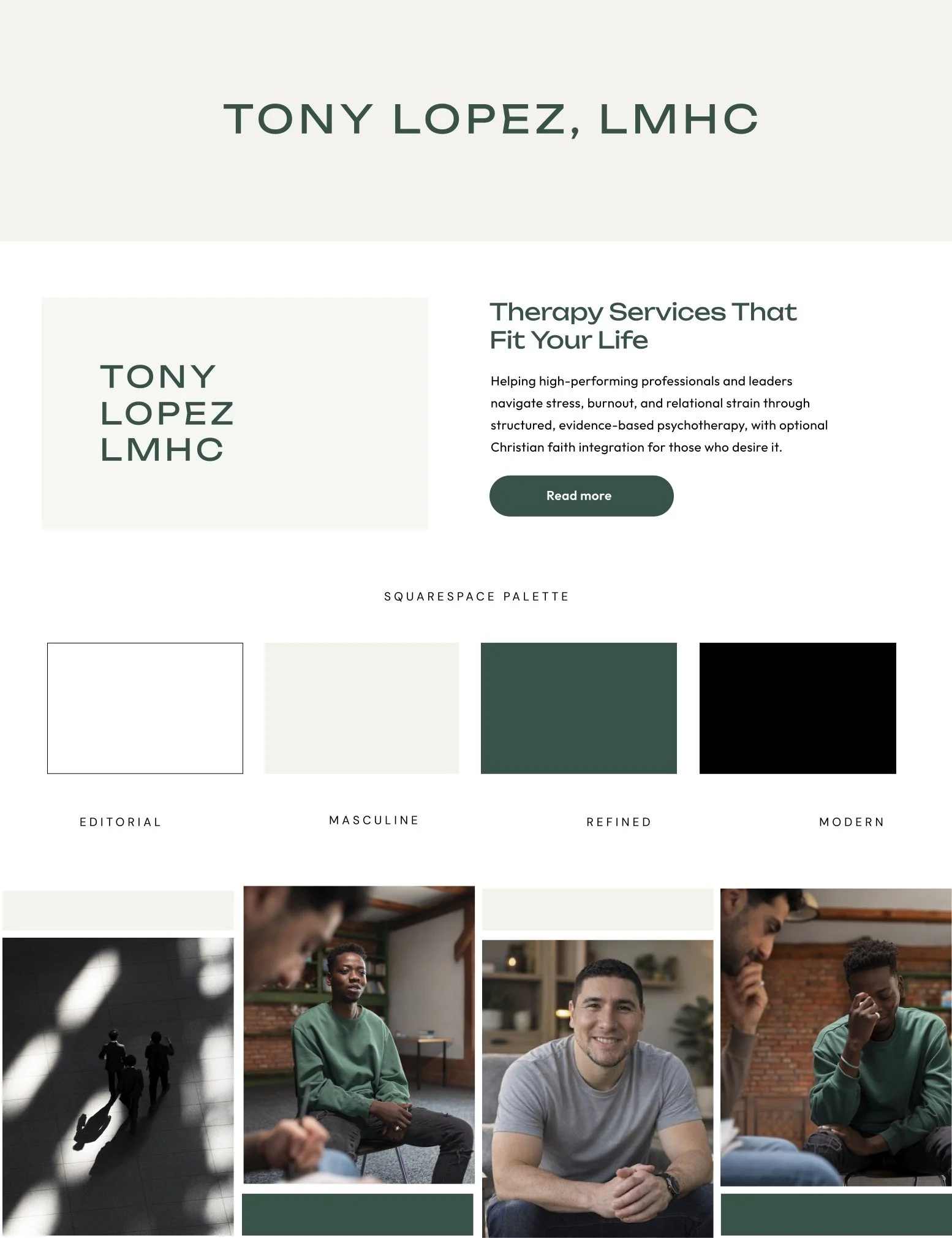
The rules are simple: one highlight color, neutrals around it, a simple font pair. That combination is what makes a site look consistent and professional.
Website Copy Basics
I know website copy is the scariest part of this for most people. Here's the main thing to understand.
Your copy should be bite-sized, meaning broken into small paragraphs, each one no more than five or six sentences. Smaller is better. Three sentences is fine. Your job is to build a clear hierarchy with headlines and subheadings and keep the paragraph copy minimal.
Why is this important at all? Because people don't read websites, they scan them. In this sense, content is design, because it gives the page its structure. People scan landing pages in an F pattern and opt-in pages in a Z pattern before they read anything properly.
So don't write big blocks of copy. Write small chunks of messaging and strong headlines. Someone should understand what your page is about from the headlines alone.
The Five Snippets You Actually Need
The brand statement. What your brand offers, and the value that benefits your ideal client. Use it in your homepage hero and on internal pages.
The brand insight. The why behind your brand, the moment that sets you apart from your competition. This goes a couple of levels deeper. For Applet Studio, my brand insight is that I'm a former journalist, so I'm good at copywriting, asking the right questions, and client communication. Clients love that. My second is that I've built a digital product business, so if you're a course creator launching something, I have the expertise for it. That belongs in your website copy, because it's how people decide whether they want to work with you.
The hook. A sentence or two that gets them reading the whole site. Call them out directly, promise a result, tell them about your method, and amplify the obstacles they're struggling with.
The transformation. A short line pointing at what they get after working with you. Going from point A to point Z.
The story. An about section or blurb you can reuse in different places. The story is always client-centric. You're not talking about yourself, you're talking about them, using yourself as a mirror so they see themselves through your eyes. The question they need to be able to answer is: why do I want to work with this person, and what value are they bringing?
Your Minimum Viable Online Presence
I see early stage founders launch a website, watch nothing happen, and conclude the website failed.
To get momentum, you need a minimum viable online presence: enough content that it starts working for you. I recommend aiming for 100 pieces of content. It also takes time — expect two to six months before you see traction.
Here's what your rough content plan should look like:
5 to 20 blog posts at launch. Do not launch an empty website with only landing pages.
Posting two or three times a week on one or two platforms, plus blogging.
A lead magnet people can download for free.
A follow-up email sequence. Seven days is a good start, longer is better. Just remember those emails have to deliver value, or people will unsubscribe.
A weekly or bi-weekly newsletter. These things work so well.
If you're comfortable writing, that's 100 blog posts. If you're comfortable on camera, that's 50 videos and 50 blog posts repurposed from those videos.
What Content Actually Gets You Hired
There's an urge to teach what you do. Resist it.
If you teach your craft, you'll attract people who want to do what you do, and that's not your target audience. You won't attract clients.
To attract clients you need expert content, content that shows you as an expert at the work itself. For most service businesses, that means case studies and behind-the-scenes of real projects.
If you don't know what to write about, think of content as a byproduct of your work. You're not conjuring up topics from nothing, you're documenting what you're already doing for clients, and adding some expert commentary to the mix.
Get to Work
All in all, you can own and curate your entire online presence. You can even make yourself look bigger than you actually are using these principles: bite-sized copy, a client-centric approach, curated visuals that show you as a professional, expert content, and consistency.
Stick to the strategy and keep going until it works. Later you layer on SEO and maybe paid ads. But in this post we covered the foundation of a website that actually brings in clients.
Frequently Asked Questions
What should I do first when building a website?
Write your content in a Google Doc before you touch a design tool. Nail down what you do, who it's for, how it works, and what you're offering. Design decisions come after the message exists.
Do I need a logo before I build my website?
No. For a service business built around your expertise, your photos matter far more than your logo. Your logo can be as simple as your name written in a font with some character, and it can wait until after your visuals, colors, and typography are settled.
How many fonts should a website use?
Two are enough. One for headlines and one for body copy. A serif headline with a sans serif body works well, as does sans serif for both. What matters is clear contrast between them and genuinely readable body text.
How long should website paragraphs be?
Five or six sentences at the absolute maximum, and three is often better. People scan websites rather than reading them, so your headlines need to carry the meaning on their own.
How much content do I need before my website starts working?
Around 100 pieces, which typically takes two to six months to build up. Launch with 5 to 20 blog posts rather than an empty site, then post consistently and support it with a lead magnet, an email sequence, and a regular newsletter.
What kind of content attracts clients rather than peers?
Case studies and behind-the-scenes of your actual work, plus expert commentary. Teaching your craft attracts people who want to do your job. Documenting your work attracts people who want to hire you.
Building a site right now? Try Squarespace free and save 20% on your first subscription with code APPLET20. Or browse our Squarespace templates – every one comes with a 12-month trial through our Platinum partner status.